![Logo_QMENTA_White_500x110.png]](https://support.qmenta.com/hs-fs/hubfs/Logo_QMENTA_White_500x110.png?height=40&name=Logo_QMENTA_White_500x110.png)
Data uploads to the QMENTA Platform works strictly with ZIP files.
See here for how to upload files to Platform.
Preparing Your Data for Upload
- Each ZIP file should contain data corresponding to one Subject ID only.
- For single time point uploads:
- You should compress all data corresponding to the single time-point into a single ZIP file.
- The system will automatically create one session for the single subject.
- For multi-time point uploads:
- This is only possible with DICOM files, since the upload process relies on information within the DICOM headers to automatically sort files by time-point.
- You should compress all data corresponding to the time-points into a single ZIP file.
- By checking the "Split Data in Sessions" checkbox, the system will automatically create different sessions per time point available, for the single subject.
- You can only upload 1 ZIP file at a time.
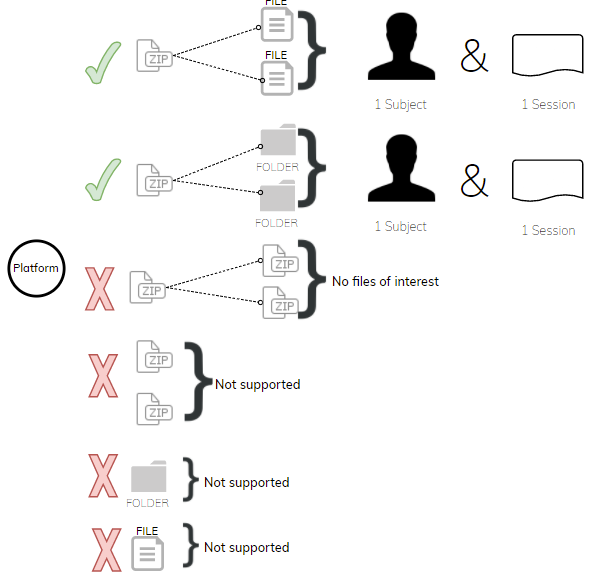
Note: If you receive a notification with "No files of Interest", it is because we are not able to unzip a folder or the system does not support the format.
Click here to see how to upload a ZIP file.
Tip: If you have several subjects to upload, you will have to do 1 by 1.
If you have several sessions for 1 subject, you will have to upload 1 by 1 and enter the same Subject name, except for DICOM files.
To conclude:
It really depends on how you structured your data and how many subjects you would like to upload.
If you only have one folder, you can convert it into a ZIP file and upload via the platform.
If you have several ZIP files/folders, we would advise using the QMENTA SDK.
Create a free account now!