![Logo_QMENTA_White_500x110.png]](https://support.qmenta.com/hs-fs/hubfs/Logo_QMENTA_White_500x110.png?height=40&name=Logo_QMENTA_White_500x110.png)
To be able to run analyses within the QMENTA Platform, you need to possess analysis credits. Credits act as a kind of ‘currency’, enabling you to perform certain actions within the QMENTA Platform. For example, each analysis you run will "cost" 1 analyses credit. More info here.
You can check the number of credits you have by hovering your mouse over the "Credits" icon in the top right corner of the dashboard.
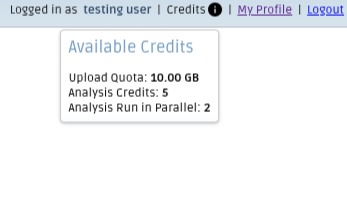
The icon is displayed in black to indicate that the user has available credits, while it changes to red when the user does not have any credits.
Under "Available Credits" :
- Upload Quota: Refers to the remaning quantity of GB granted to your user to upload data to the QMENTA Platform.
- Analysis Credits: Refers to the number of analyses that your user can execute in the QMENTA Platform. Each time an analysis is launched, a credit will be deducted. The upload of data does not charge credits.
- Analysis run in parallel: Refers to the maximum number of analyses that your user can run simultaneously in the QMENTA Platform.
This icon is merely informative. If you wish to be granted more quota, credits or parallel analyses, please contact QMENTA support via support@qmenta.com.
The credits displayed on the dashboard represent the personal analysis credits associated with your user account. Furthermore, it is possible to assign project-level analysis credits independently from your personal analysis credits.
Create free account now!